Reporting your social media work to council and leadership
Council members, managers and boards increasingly ask what the government’s social media is doing. It’s a good question to get: it means leadership sees the work as part of how the government serves residents. This guide covers what to include in a regular update, how to tell the story in a few minutes, and how a monthly GovFeeds report can put it together for you.
What leaders usually want to know
Most questions from council or a manager come down to four things:
- Are residents seeing and using what we post? Not just how many followers you have, but whether people engage with and pass along the information.
- What are we communicating about? The range of services and topics your posts cover across the month.
- What’s working, and what will we try next? A sense that the work is being steered, not just produced.
- What are communities like ours doing? Useful context, and often a source of good ideas to borrow.
A good update answers all four in a page or two that someone can read in a few minutes.
What to include
Posting rhythm. How many posts went out and how steady the weekly rhythm was. Consistency matters because it builds the audience that is there when you need it during an emergency or a road closure. For context, a typical town under 10,000 posts about 13 times a month, a city of 10,000 to 50,000 about 20, and a larger city or county about 29, based on our analysis of 23,167 municipality-months.
Engagement per post, as a median. The median shows what a typical post earns. An average is easily pulled up by one widely shared post, so the median gives leadership a steadier picture month to month.
Shares. Across local government, about 56% of posts earn at least one share, while about 34% earn a comment. Residents forward civic information more than they debate it, so shares are a good sign a post was useful. “Residents passed this along” is a sentence leadership understands right away. (More in why local governments get shared more than they get commented on.)
Every page, not just the main account. Police, parks, the library, public works and other department pages often carry a large share of a government’s communication. Including them shows the full picture of what the organization is doing.
Your content mix. A simple breakdown by topic shows the range of the work, from public safety to events to board meetings, and helps you spot topics residents might want more of.
A few standout posts, and one idea for next month. Show the posts residents responded to most, say what made them work, and name one thing you plan to try. It turns the report from a scorecard into a plan.
How the GovFeeds monthly report does this for you
Every GovFeeds subscription includes a monthly report for your government, delivered in the first week of each month. It covers your Facebook, Instagram, X and YouTube accounts, including department pages, and sits alongside data from thousands of other local governments, so you can see what is resonating for communities like yours. Here is what is inside, using the published sample report for Cleveland County, North Carolina.
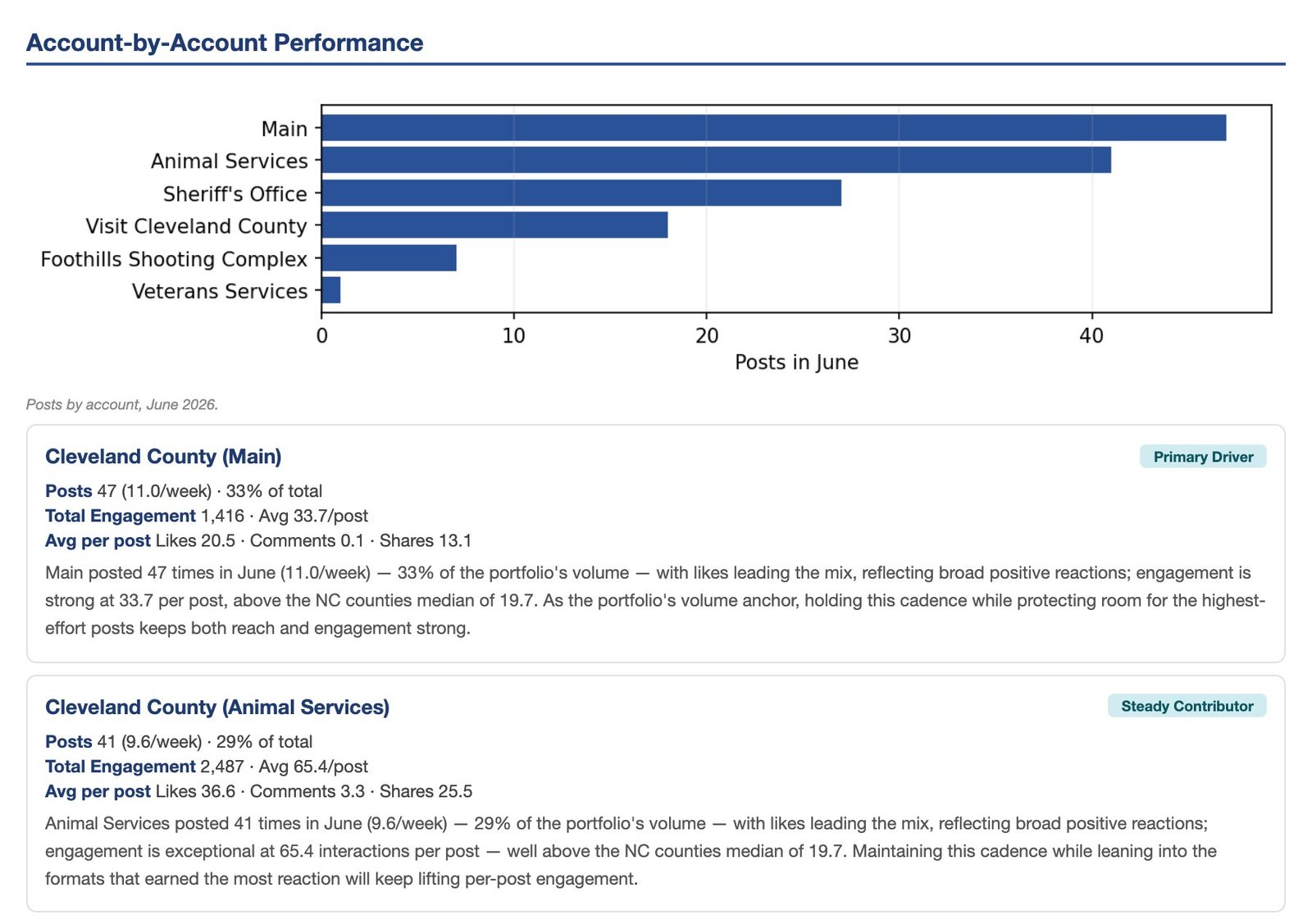
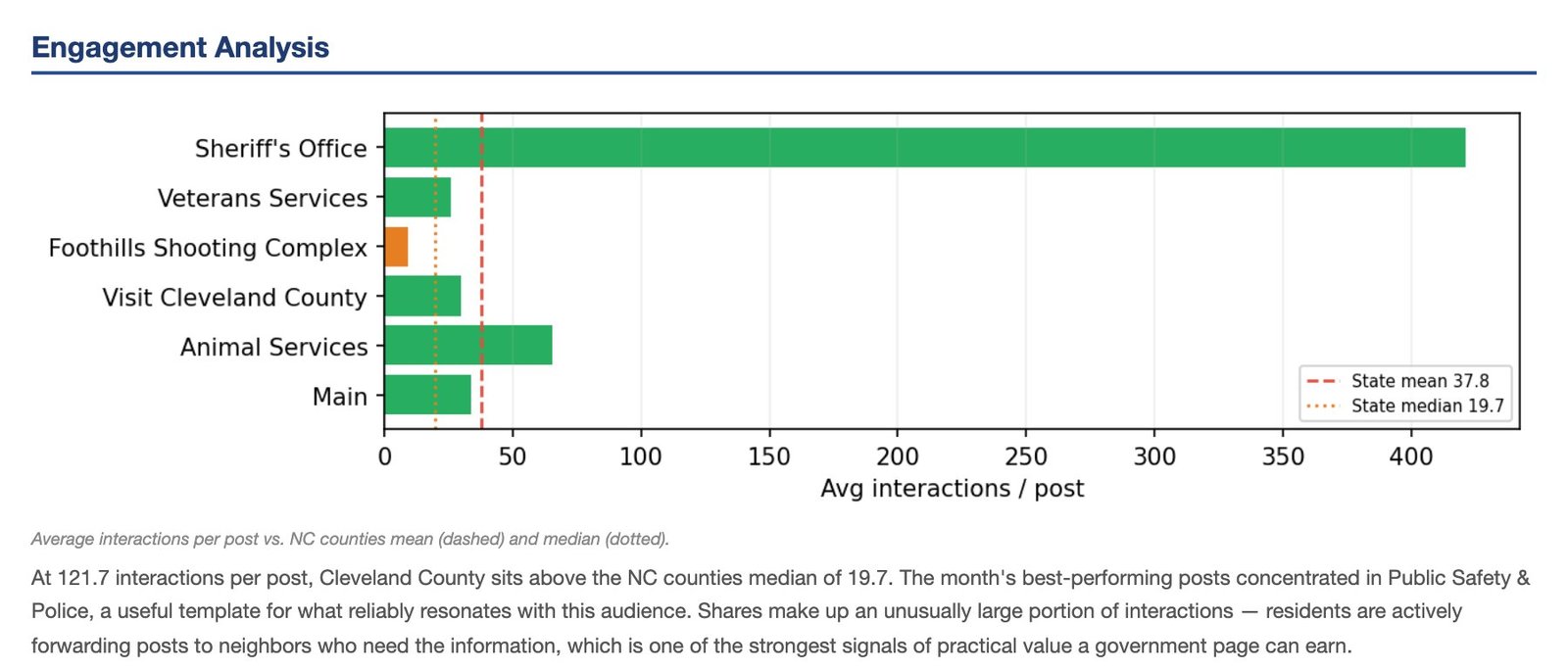
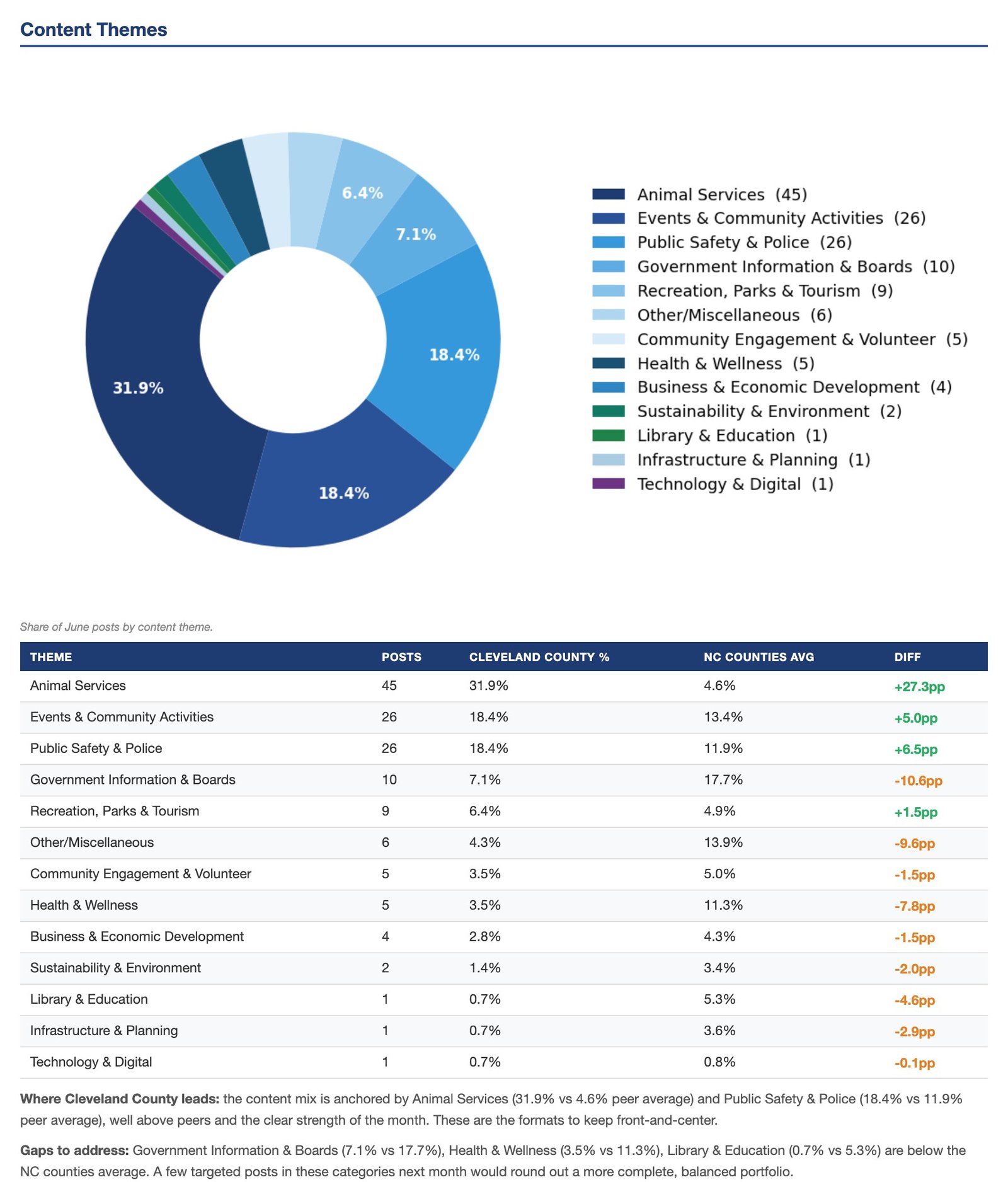
The report also lists the month’s most-engaged posts, shows how the month compares with the one before, and ends with a short set of recommendations for the month ahead, often drawn from what is working in other governments.
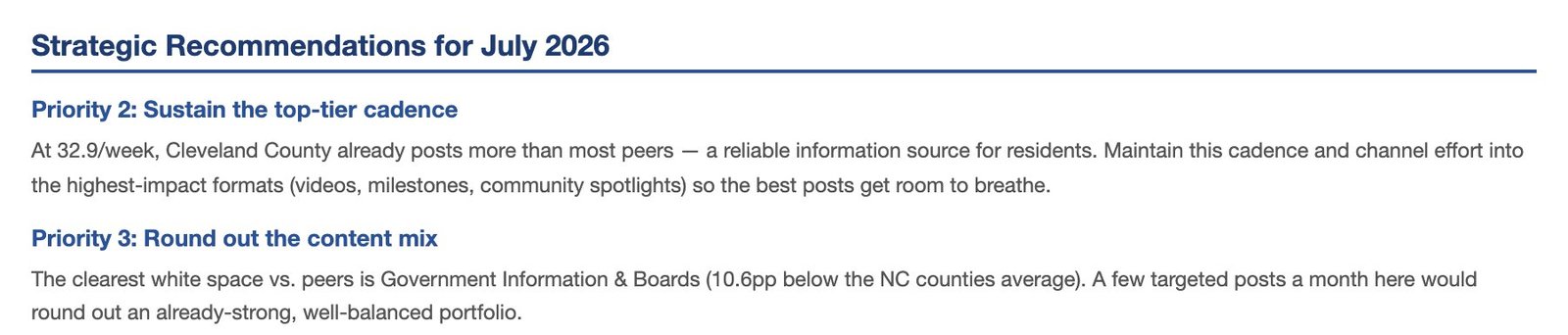
The report is ready to share. It sits in the Reports tab of your GovFeeds account as a PDF, and you can send leadership a link that opens it without a login. Subscribers regularly ask us to adjust their reports, for example adding a department page, changing the governments used for context, or formatting a version for a printed council packet, and we do.
What subscribers do with it
Most subscribers fold the report straight into their own reporting, to the manager, the board or a staff meeting, usually within days of it arriving. In their words:
“I am so impressed. This information is incredibly useful. Our current Board of Commissioners is very focused on performance metrics and outcomes, and we are doing a lot of work in this area.”
Assistant Town Manager, North Carolina, on the town’s first report
“This is super helpful to our planning. I will be sharing at a staff meeting next week. Really looking forward to how this plays out as we adjust our messaging and get additional feedback.”
Town Administrator, New England
“We are LIVING for these benchmark reports!!”
Communications Director, Municipal Government, Texas
More in what users actually say about GovFeeds.
Telling the story in a few minutes
- Open with one plain sentence. What happened this month and what it means, before any numbers.
- Show a post residents passed along. One real example, with how many people shared it, makes the work concrete.
- Show the range. The topic breakdown helps leadership see the parks, utilities and public-safety work, not just the event photos.
- Share what other governments are doing. “Several towns our size are posting weekly road-work updates, and residents share them widely, so we’re going to try it” is the kind of idea leadership is glad to hear.
- Say plainly when things went well. Good news is worth reporting, with the number attached. It helps leadership see the value of the work.
- Close with next month’s plan. One or two things you’ll try, and how you’ll know if they worked.
The research behind this
The figures here come from our own published analysis of local-government posts: what an engaging month looks like across 23,167 municipality-months and why local governments get shared more than they get commented on. Both include full methodology.
A report your leadership will read, every month.
See what’s working for your government and for communities like yours, in a report that’s ready to share.